
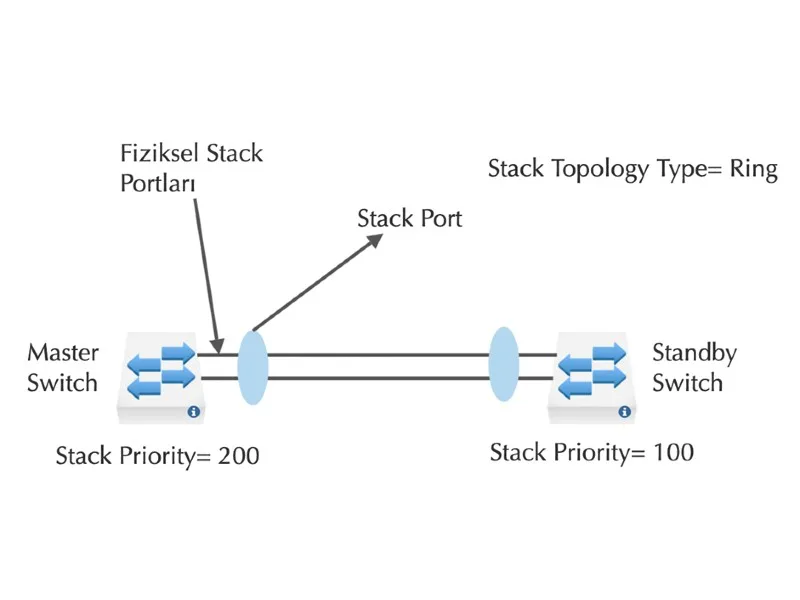
Example of Setting Up a Stack Using Port Connections (Huawei)
A stack is a network solution consisting of two or more stackable switches. Switches that operate as part of a stack group behave like a single device. As a result, the stack solution exhibits the features and functionality of a single switch while having an increased number of ports, thus simplifying network management while providing high network reliability and scalability.
Why a Stack?
A stack allows users to expand their network capacity without the difficulty of managing multiple devices.
Stackable switches can be added to or removed from a stack group as needed, without affecting the overall performance of the stack. Depending on its topology, the stack group can continue to transfer data even if a link or unit within the stack group fails. This makes the stack group an effective, flexible and scalable solution for expanding network capacity.
This article covers adding two Huawei-brand switches to a stack group and performing the verification checks.
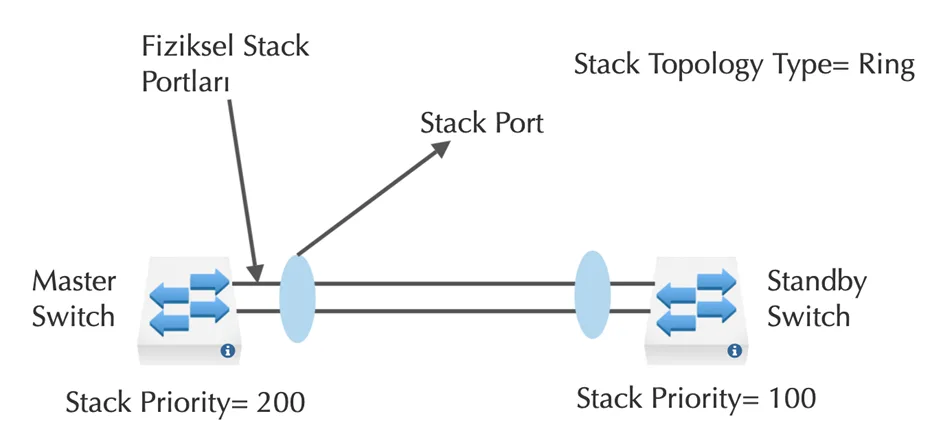
Defining the Switch Stack Ports
SWITCH_1
[SWITCH_1]interface stack-port 0/1
[SWITCH_1-stack-port0/1]port interface xGigabitEthernet 0/0/1 enable
Warning: Enabling stack port cause configuration loss on the interface, continue?[Y/N]:y
Info: This operation may take a few seconds. Please wait for a moment...
[SWITCH_1-stack-port0/1]quit

[SWITCH_1]interface stack-port 0/2
[SWITCH_1-stack-port0/2]port interface XGigabitEthernet 0/0/2 enable
Warning: Enabling stack port cause configuration loss on the interface, continue?[Y/N]:y
Info: This operation may take a few seconds. Please wait for a moment...
[SWITCH_1-stack-port0/2]quit
SWITCH_2
[SWITCH_2]interface stack-port 0/1
[SWITCH_2-stack-port0/1]port interface XGigabitEthernet 0/0/1 enable
Warning: Enabling stack port cause configuration loss on the interface, continue?[Y/N]:y
Info: This operation may take a few seconds. Please wait for a moment...
[SWITCH_2-stack-port0/1]quit

[SWITCH_2]interface stack-port 0/2
[SWITCH_2-stack-port0/2]port interface XGigabitEthernet 0/0/2 enable
Warning: Enabling stack port cause configuration loss on the interface, continue?[Y/N]:y
Info: This operation may take a few seconds. Please wait for a moment...
[SWITCH_2-stack-port0/2]quit
Defining the Switch Priority Values and Stack IDs
SWITCH_1
[SWITCH_1]stack slot 0 priority 200
Warning:Please do not frequently modify Priority, it will make the stack split! continue?[Y/N]:y
SWITCH_2
[SWITCH_2]stack slot 0 renumber 1
Warning: All the configurations related to the slot ID will be lost after the slot ID is modified. Please do not frequently modify slot ID, it will make the stack split. Continue?[Y/N]:y
Info: Stack configuration has been changed, need reboot to take effect.
Physically Activating the Stack Configuration
All switches to be added to the stack group are powered off. The stack cables are connected and all switches are powered on one by one.
Performing the Verification Checks
<SWITCH_1>display stack
Stack topology type: Ring
Stack system MAC: 845b-123a-1132
MAC switch delay time: 10 min
Stack reserved vlan: 4093
Slot of the active management port: --

Slot Role     Mac address     Priority   Device type
-----------------------------------------------------
0    Master   845b-123a-1132  200        S5700-28X-PWR-LI-AC
1    Standby  845b-123a-1102  100        S5700-28X-PWR-LI-AC