
RecoverPoint for Virtual Machines
RecoverPoint for VM provides local replication or replication of the virtual servers in your Production environment to a Disaster environment. It protects your virtual servers with local or remote replication so they can be recovered in the event of a disaster.
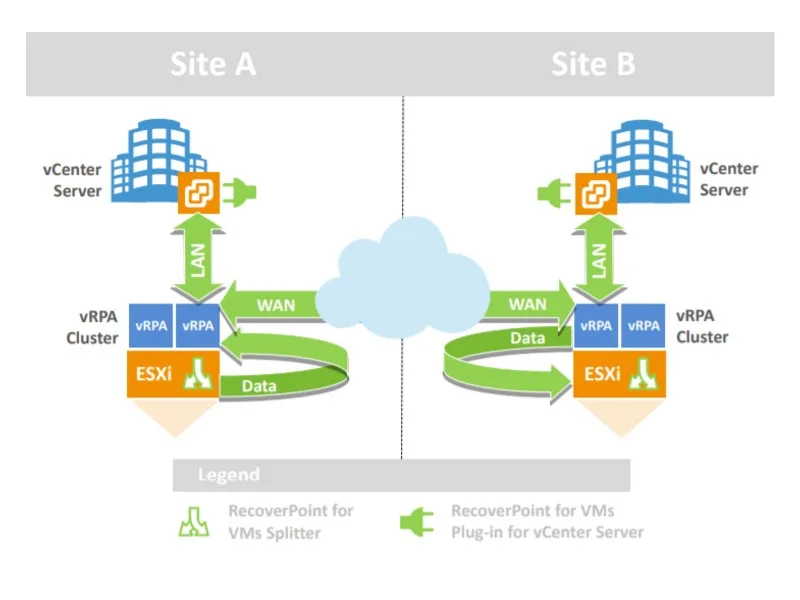
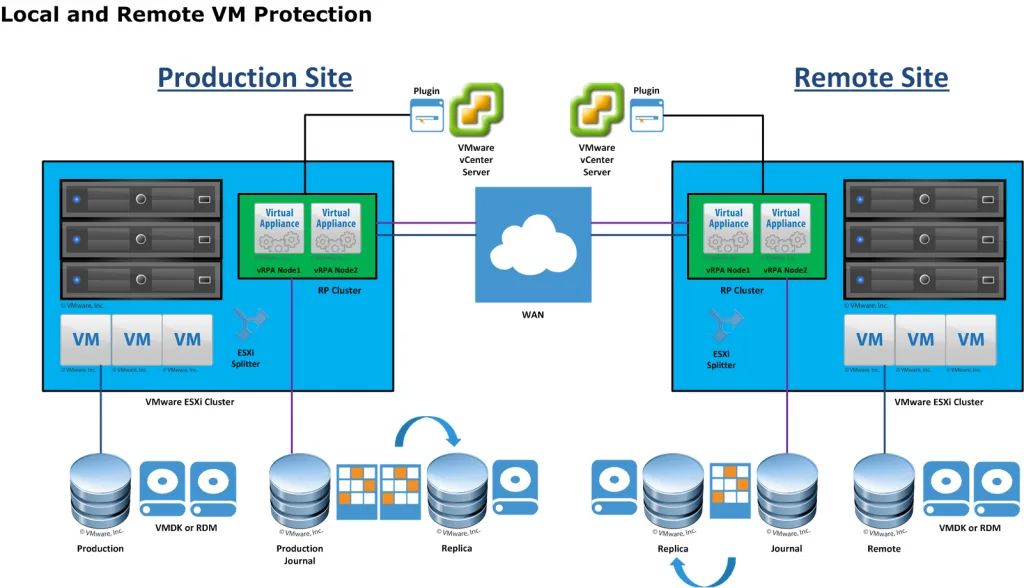
It provides local and remote replication with continuous data protection for per-VM recovery at any point in time. It supports both virtual disk types: VMDKs and RDMs. The following shows the architecture components: a VMware vCenter plug-in, a RecoverPoint write splitter embedded in the vSphere hypervisor, and RecoverPoint virtual appliances, all fully integrated within a VMware ESXi server environment.
The splitter is installed into each ESX server that will host the VMs you want to protect and replicate. The splitter communicates with the RecoverPoint virtual appliances for local replication within the same ESX cluster or located at the Disaster site. The splitter splits the write IOs to a VM's VMDK/RDM and sends a copy to the production VMDK and to the RecoverPoint cluster that is to be replicated. The RecoverPoint for VM servers do not need to reside on the same ESX server or cluster as the VMs to be replicated.
Advantages Provided by RecoverPoint for VM
- Enables Continuous Data Protection for any-point-in-time recovery to optimize RPO and RTO.
- Provides recovery consistency for interconnected servers.
- Provides synchronous or asynchronous replication policies.
- Reduces WAN bandwidth consumption and makes the best use of available bandwidth by using compression and deduplication.
- Provides replication to multiple branches. While providing replication from one site to 4 different Disaster environments or from 4 different sites to 1 Disaster environment, it offers the ease of managing them from a single screen.
- In the event of user errors, it allows the selected recovery point to be restored from the Disaster environment to the production environment in a very short time.
- When the cloud becomes a more important part of your DR strategy, it provides replication on Azure, AWS and VMware Cloud.