

The IEEE 802.1x standard was developed to provide a method for authenticating the identity of devices attempting to access a switch port. In most organizations, access to a switch port provides access to the internal network and, along with it, a direct connection to multiple resources that require a high level of security. The 802.1x standard is one of the technologies that can be used to provide security in these situations. The standard provides a method that allows traffic to be sent and received over a switch port after an authentication sequence has been performed. The authentication information is processed by a central authentication server. Once this process is successful, the port will allow traffic normally.
Concepts
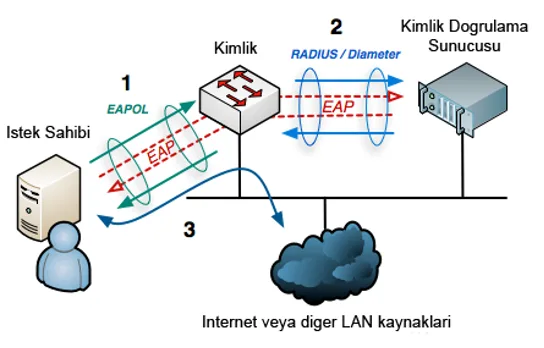
As shown in Figure 1, there are some basic roles defined in the 802.1x standard:
Supplicant: The endpoint device that requests access to the network.
Authentication Server: The device used to perform the actual authentication of the supplicant. The authentication server verifies the supplicant's credentials and informs the authenticator to open the switch port when authentication is successful.
Authenticator: The device that directly controls the switch port to which the supplicant is connected. The authenticator acts as an intermediary between the supplicant and the authentication server. It forwards the supplicant's authentication requests to the authentication server. When authentication is successful, it allows the supplicant access to the network.
How Does It Work?
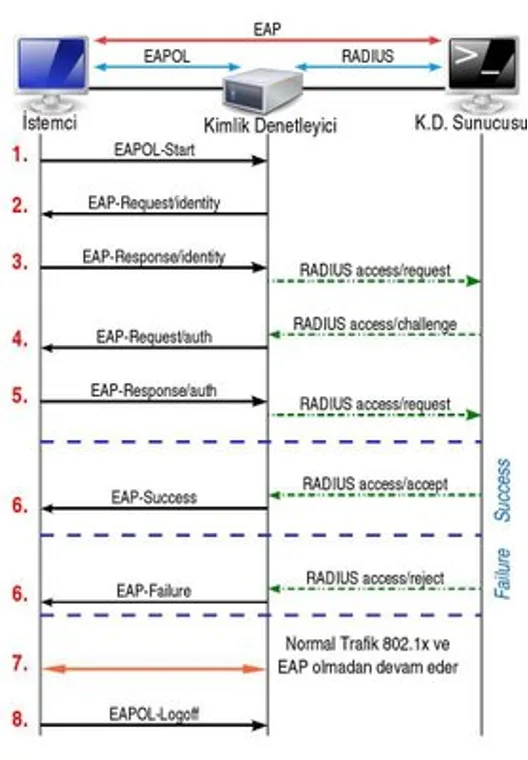
- The authenticator device, located between the supplicant and the authentication server, sends an EAP-Request/Identity packet to the supplicant, asking it to identify itself.
- The supplicant responds with an EAP-Response/Identity packet that identifies itself. This packet is encapsulated and sent to the authentication server.
- The authentication server issues a challenge to the authenticator device. The authenticator device encapsulates this packet with EAPOL and sends it to the supplicant. The supplicant responds to this challenge through the authenticator device.
- If the supplicant has the required user definition and rights, access is granted through the authenticator packets that the authentication server sends to the authenticator device.
With the 802.1x protocol, identity verification is performed for three purposes:
Authentication: Granting the supplicant the right to access the system, program or network.
Authorization: Confirming the identity of the device or user on servers, switches or routers.
Accounting: The process performed to track what any user does and to monitor user actions.
Each switch port configured as an 802.1x authenticator can be in one of two states, authorized or unauthorized, as shown in Figure 3.
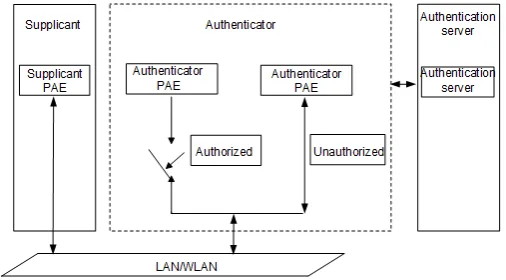
An unauthorized switch port allows only three types of traffic:
- EAPOL (used for authentication)
- CDP
- STP
Once authentication is performed successfully, all traffic is allowed. The authentication traffic between the supplicant and the authentication server takes place via EAP (Extensible Authentication Protocol). EAP is not an authentication method but a transport protocol. With EAP, the traffic generated during authentication is transmitted in an encrypted manner. The EAP packet is forwarded to the authenticator encapsulated within an EAPOL packet. Between the authenticator and the authentication server, the packet is re-encapsulated and transmitted within a RADIUS packet. There are many EAP methods that can be used for authentication:
- EAP-MD5: A method that provides minimal security via a hash method. Identity verification is not mutual. Since no mutual key exchange is provided, it is vulnerable to dictionary attacks.
- LEAP (Lightweight Extensible Authentication Protocol): A Cisco-proprietary protocol that provides mutual authentication to verify a user. The LEAP method uses username/password verification and WPA key exchange. Because this method does not have very strong security, Cisco recommends either using very complex passwords or using methods such as EAP-FAST, PEAP or EAP-TLS.
- EAP-TLS: Provides two-way authentication. A digital certificate must be present on both the server and user side.
- EAP-TTLS: Uses a TLS tunnel between the authentication server and the supplicant, and has a second tunnel encapsulated within the first to encapsulate different EAP methods such as PEAP. Unlike EAP-TLS, EAP-TTLS does not require both the supplicant and the authentication server to be authenticated.
- EAP-FAST: Developed by Cisco. It is designed for organizations that use strong passwords and seek a method that does not rely on digital certificates.
Configuration
On Cisco devices, there are three different IEEE 802.1x switch port states you can choose from:
Auto: In this state, the port will start in an unauthorized state and only EAPOL, CDP and STP traffic will be allowed. After authentication is performed, all other traffic will be allowed.
- Forced-Authorized: In this state, IEEE 802.1x is essentially disabled because all traffic is allowed. This is the default port state.
- Forced-Unauthorized: In this state, the port ignores all traffic, including authentication requests.
As can be understood from the states mentioned above, in the IEEE 802.1x standard we should configure the port state as auto.
There are a number of different ways IEEE 802.1x can be configured. This article shows the commands required for a basic configuration on Cisco devices.
Enter privileged mode.
switch>enableEnter global configuration mode.
switch#configure terminalEnable IEEE 802.1x globally.
switch(config)#dot1x system-auth-controlEnable AAA.
switch(config)#aaa new-modelEnable IEEE 802.1x AAA authentication.
switch(config)#aaa authentication dot1x default group radiusEnter interface configuration mode.
switch(config)#interface interface xConfigure the switchport mode for access.
switch(config-if)#switchport mode accessConfigure the port to operate as an IEEE 802.1x authenticator.
switch(config-if)#dot1x pae authenticatorConfigure the switchport IEEE 802.1x state.
switch(config-if)#authentication port-control [auto | force-authorized | force-unauthorized]